

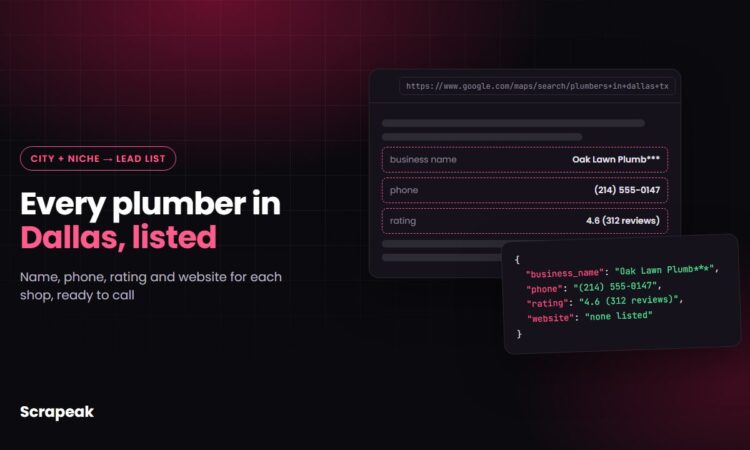
Say you sell a service to plumbers. Maybe it’s websites, call answering or financing for their customers. Every plumber in Dallas who could buy from you is already sitting on Google Maps with a name, a phone number and usually a website. Google Maps leads are that list, pulled out of the map and into a spreadsheet you can work through.
Copying them by hand works for about twenty listings before you give up. Below is how to get the whole city into a clean file, which columns to keep, and how to sort the list so you call the likely buyers first. We’ll use plumbers in Dallas as the running example, but the same steps fit dentists in Phoenix or roofers in Tampa.
What a Google Maps lead list contains
Each business profile on the map carries more than people expect. A scraper can extract most of what you see when you click a listing and turn it into one row per business in a CSV or Google Sheet.
A typical export has these columns:
- business name and main category (Plumber, Water heater installation service)
- phone number and website URL
- full address, plus latitude and longitude
- star rating and number of reviews
- opening hours
- the review text itself, if you scrape reviews as well
What you won’t find is an email address or the owner’s name. Google Maps doesn’t publish either. Getting them takes a second step, which we cover below.
Our Google Maps scraper pulls names, phone numbers, websites, ratings, reviews, opening hours and coordinates through a web dashboard or an API. Each search costs 10 credits, so the 1,000 free credits you get at signup cover about 100 searches, which is plenty to test a city or two before paying anything.
How to build Google Maps leads in six steps
The whole job takes an afternoon the first time and minutes after that, because the searches stay the same. Here is the order we’d follow.
1. Pick one niche and one area
Write the search exactly as a customer would type it into Maps: “plumber in Dallas, TX”. Vague searches return vague lists. If you sell to two niches, run them as separate searches and keep them in separate tabs, because your pitch will differ anyway.
2. Split the area into smaller searches
One search for a big city never returns every business. Maps stops loading new places after a limited number of results, so a city the size of Dallas needs to be broken up. Run the same search for each neighborhood or ZIP code instead: “plumber 75201”, “plumber 75204”, “plumber Oak Cliff” and so on. A scraper takes the list of searches and runs them one after another, so twenty searches cost you no more effort than one.
3. Run the scraper and export
Paste the search list into the scraper, run it, and export the results as CSV or straight to Google Sheets. If you work with a developer, the same scraper can be called through the API and the data delivered as JSON to your CRM.
4. Deduplicate
Neighboring ZIP codes overlap, and many plumbers serve several of them, so the same shop shows up more than once. Deduplicate on phone number first, then on website domain. Expect the merged list to shrink noticeably after this step.
5. Add emails from the websites
For listings with a website, a second scraper can crawl the home page and contact page and extract any email address published there. Plenty of small shops only show a phone number or a contact form, so a share of rows will stay without an email. Those are still good phone leads.
6. Schedule a repeat run
New businesses open every month, and some close. Scheduling the same searches to run monthly gives you a short list of brand-new listings each time, which are often the warmest leads in the file because nobody has called them yet.
Want to see what your city looks like in a spreadsheet? Try it free with 1,000 credits. No credit card needed.
Filters that turn a scraped list into buyers
A raw export of 600 Dallas plumbers is a phone book. The columns you scraped are what let you sort it into people likely to say yes. Which filter matters depends on what you sell.
- No website listed. If you build websites, this is your list. Filter the website column for blanks.
- Low rating with lots of reviews. A 3.4 average over 200 reviews means a busy shop with a reputation problem. That’s a reputation management or call handling pitch.
- Few reviews, good rating. Young businesses with 5 to 20 reviews often want more customers and haven’t signed with an agency yet.
- Opening hours. Shops that close at 5 p.m. miss evening emergency calls. Useful if you sell answering services.
- Category. “Water heater installation service” and “Plumber” are different businesses with different budgets. Split them.
Spend ten minutes reading the review text for your top 30 rows before calling. If customers keep saying “never called back”, you already know your opening line.
Where scraping Google Maps gets tricky
The map looks simple, but it’s a hard site to scrape at volume, and most of the trouble is invisible until your list comes back short.
Results load as you scroll, so a scraper has to handle that infinite scroll the way a person would, or it stops after the first screen. Google also limits automated traffic, so large runs need rotating proxies and careful pacing to avoid CAPTCHAs and blocked requests. The page layout changes from time to time, and a scraper built on last year’s structure can start returning empty phone or website fields without any error message.
Data quality is the other half. Listings include closed businesses, duplicates under slightly different names, and service-area businesses that hide their street address. Good scraping output marks those instead of quietly passing them through.
This is the part we handle. The ready-made scraper takes care of scrolling, proxies and parsing, and if you need something custom, like 40 cities refreshed every week with emails added and the file dropped into your Google Drive, tell us what you need and we’ll quote a scraper we build and maintain. If you’re weighing that against writing your own, our comparison of a web scraping service vs an in-house scraper lays out the real costs.
Reaching out without burning the list
Phone works best for local trades, since the number on the map is usually the one the owner picks up. If you email, US commercial email falls under the CAN-SPAM Act: say who you are, use an honest subject line, include your physical address and a working way to opt out. The full requirements are in the FTC’s CAN-SPAM rule (16 CFR Part 316). Leads in Europe or Canada come with stricter consent rules, and Google’s own terms apply to how you collect the data, so get legal advice before running a big campaign.
Keep the first message short and specific to what you saw in their listing. “Noticed you don’t have a website linked on Google Maps” beats any template.
Get your city’s Google Maps leads into a spreadsheet today. Run your niche and ZIP codes through the Scrapeak Google Maps scraper and export the results to CSV or Google Sheets. Need a bigger setup with scheduled runs, emails and delivery to your CRM or cloud storage? We’ll build and run it for you.
Try it free with 1,000 credits · Get a quote for a custom lead feed · See pricing
FAQ
Can you get emails from Google Maps?
Not directly. Google Maps listings show a phone number and usually a website, but no email field. To add emails, a scraper visits each business website and pulls any address published there, such as on the contact page. Expect gaps, because many small businesses only list a phone or a contact form.
Is it legal to scrape Google Maps for leads?
It depends on Google’s terms, how you collect the data and the laws where you and your leads are. Business listings are public, but how you use them still matters. Check the terms yourself and talk to a lawyer before running a large outreach program.
How many leads can I get from one Google Maps search?
Fewer than you might expect. A single search stops loading new places after a limited number of results, so a large city needs to be split into neighborhoods or ZIP codes and the results merged and deduplicated.
How do I keep a Google Maps lead list up to date?
Schedule the scraper to run again weekly or monthly with the same searches, then compare the new export with the old one. New listings are fresh leads, and businesses that closed or lost their phone number can be removed.
Do I need to code to scrape Google Maps?
No. You can use a ready-made Google Maps scraper from a web dashboard and download a CSV, or call the same scraper through an API if you have a developer. For a custom setup, a scraping company can build and run it for you.