

You asked a developer how to get Zillow prices into a spreadsheet every week, and they said, “Just use a scraping API.” Then they moved on, and you were left nodding. So, what is a web scraping API, and do you actually need one?
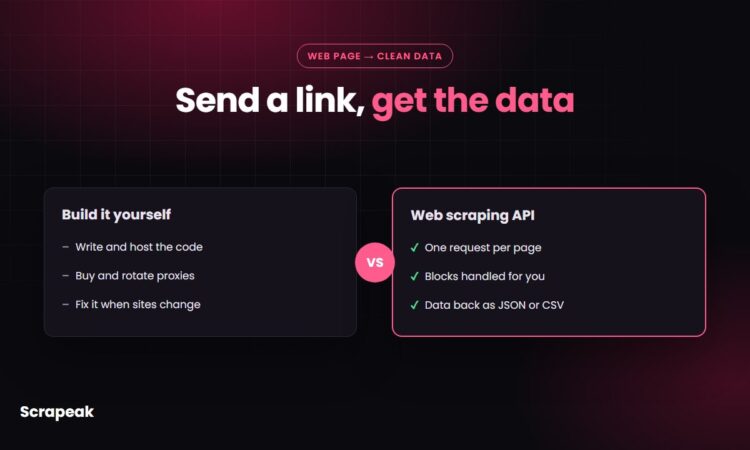
Short version: it’s a service you send a web address to, and it sends back the data from that page in a clean, organized format. All the messy work in between (loading the page, getting past blocks, pulling out the numbers) happens on someone else’s servers.
What is a web scraping API, in plain English?
Think of ordering at a restaurant counter. You say “one burger, no onions,” and a few minutes later a burger shows up. You never see the kitchen, the fryer or the person who forgot the onions the first time.
A web scraping API is the counter. You hand over an order like “the details for this Zillow listing” and you get back a tidy package: price, bedrooms, bathrooms, year built. The kitchen is the web scraping setup: the servers, the browsers, the code that reads the page.
The “API” part just means the order and the reply follow a fixed format that software can read. MDN’s glossary describes an API as a set of features and rules that lets one piece of software talk to another. Here the two pieces are your tool (a spreadsheet, a CRM, a script) and the scraping service.
If you’d rather see one than read about it, the Scrapeak Scraper Store lists the ready-made scraping APIs we run, and new accounts get 1,000 free credits to try them with no credit card.
What the scraping API does after you hit send
From your side it’s one request. On the provider’s side, a lot happens in a few seconds:
- It fetches the page from a server that looks like a normal visitor, often through a pool of rotating proxy addresses so one IP isn’t hammering the site.
- If the site builds its content with JavaScript, it loads the page in a real browser and waits for the prices and listings to appear.
- If the site pushes back with a block, a slow response or a CAPTCHA, it backs off and retries.
- It parses the page, which means finding the exact spots where price, address or rating sit and copying them out.
- It returns the result as JSON (or CSV, depending on the service), with the same field names every time.
Step 4 is where most homemade scrapers fall apart. Websites change their layout without warning, and a scraper that looked for the price in one spot suddenly returns blanks. With a managed scraping API, fixing that is the provider’s job, so your spreadsheet keeps filling up on Monday morning.
Some services only do steps 1 to 3 and hand you the raw page code. Those are closer to proxy tools. If you aren’t a developer, look for one that does the parsing too and returns named fields.
A real scraping API request, read line by line
Here’s the actual Python example from the Zillow Scraper docs. You don’t need to write it yourself, but seeing it once takes the mystery out:
import requests

api_key = "YOUR-API-KEY"
property_zpid = "66288024"

api_url = "https://app.scrapeak.com/v1/scrapers/zillow/property"
params = {"api_key": api_key, "zpid": property_zpid}

response = requests.get(api_url, params=params)
print(response.text)
Read it like a sentence. “Here’s my key. Here’s the Zillow property ID (the zpid, the number at the end of every Zillow listing URL). Go to the property endpoint and bring back what you find.”
What comes back is a block of JSON with fields like price, bedrooms, bathrooms, yearBuilt, homeStatus, city and zipcode. A JSON file looks scary in a text editor, but every row of it is just “field name: value”. Open it in Google Sheets with an add-on, or ask for CSV, and it turns into columns.
The API key is how the service knows the request is yours and counts it against your credits. Keep it private, like a password.
Want to try a request without writing code? Sign up, copy your key from the dashboard and test the Zillow Scraper or the Google Maps Scraper on a few listings. Try it free with 1,000 credits.
Scraping API vs official API vs building your own scraper
People mix these three up, and each one gets you different data with a different amount of upkeep.
| Official API (from the site) | Web scraping API | Your own scraper | |
|---|---|---|---|
| Who runs it | The website itself | A scraping provider | You or your developer |
| What data you get | Only what the site chooses to share | What’s publicly visible on the page | Whatever you code it to extract |
| Who fixes it when the site changes | The site | The provider | You |
| Blocks and proxies | Not an issue, but rate limits apply | Handled for you | Your problem |
| Typical cost | Free to expensive, often needs approval | Pay per request or credit | Developer time plus proxies and servers |
If a site has an official API that gives you the fields you need, use it. Plenty don’t, or they lock the useful fields behind partner programs. That gap is why scraping APIs exist.
Building your own makes sense when you have a developer with spare time and a site that rarely changes. We broke down the real numbers in web scraping service vs in-house, and the short answer is that maintenance costs more than the first build.
When a scraping API is worth it (and when it isn’t)
A scraping API earns its keep when you need the same kind of data again and again. Some examples:
- An investor checking 300 listings in three ZIP codes every Monday for price drops.
- An agency pulling every dentist in Phoenix from Google Maps, with ratings and websites, to build a prospect list.
- A store watching 50 competitor product pages for price changes.
It’s overkill when the job is small and one-off. If you need 40 rows once, copy them by hand over a coffee. You’ll be done before you finish reading API docs.
It’s also the wrong fit when no ready-made API covers your site. Most scraping APIs are built per site (Zillow, Google Maps, Amazon) or are generic “fetch any page” tools that still leave the parsing to you. For a county court portal, a niche directory or a pile of PDFs, a custom scraper built for that one source is usually less hassle.
You don’t have to write code to use a scraping API
The code example above scares off a lot of people, which is a shame, because many teams using scraping APIs never touch it. There are three easy routes.
The first is the provider’s dashboard. You paste in a URL or a search, click run, and download a CSV. Fine for occasional pulls.
The second is no-code tools like Zapier or Make, which can call an API on a schedule and drop the results into Google Sheets or your CRM. Someone sets it up once, and after that it runs by itself.
The third is scheduled delivery. Instead of you calling the API, the provider runs the scraper hourly, daily or weekly and sends the file wherever you want: email, Google Drive, Dropbox, an S3 bucket or FTP. Scrapeak delivers in CSV, JSON, JSONLines or XML, so the file opens in whatever your team already uses. For finished datasets you can also look at the Data Store.
Honestly, for most small businesses the third route is the right one. You care about the spreadsheet landing on time, and nobody on your team should be babysitting API calls.
What a web scraping API costs
Most scraping APIs charge in credits. Each request uses a set number, and harder pages (ones that need a full browser or heavy unblocking) use more. On Scrapeak, for example, one People Search lookup costs 100 credits, and new accounts start with 1,000 free credits.
Three things move the bill: how many pages you scrape, how often, and how hard the site is to scrape. Pulling 200 listings once a week is cheap. Pulling 50,000 product pages every hour from a site with heavy bot protection is a different budget. Our web scraping cost guide walks through real ranges, and the pricing page shows current plans.
Five questions to ask before you pick one
- Does it return named fields, or just raw HTML that someone still has to parse?
- What happens to my credits when a request fails? (Good providers don’t charge for failures.)
- Can it deliver on a schedule to Google Sheets, email or cloud storage, or do I have to call it myself?
- Who fixes it when the target site changes its layout, and how fast?
- If my site isn’t covered, will you build a scraper for it?
Vague answers to questions 3 and 4 usually mean you’re buying a tool you’ll end up maintaining yourself.
One more note on rules: a scraping API should only collect publicly available data, and whether a given use is allowed depends on the site’s terms and your jurisdiction. If you’re unsure, check with a lawyer before you scale up. Google’s robots.txt guide is a good primer on how sites tell automated visitors what they’d prefer them not to crawl.
FAQ
Do I need to know how to code to use a web scraping API?
No. You can run requests from the provider’s dashboard, connect the API to Google Sheets through a no-code tool, or have the provider deliver files to you on a schedule. Code helps only if you want to build the data into your own software.
What is the difference between a scraping API and a proxy?
A proxy only changes the address your requests come from. A scraping API also loads the page, deals with blocks and retries, and pulls out the data into named fields. With a proxy alone, you still need your own scraper.
What format does a web scraping API return data in?
Usually JSON, which software reads easily. Many services, Scrapeak included, can also deliver CSV, JSONLines or XML, so the data opens straight in Excel or Google Sheets.
Can a scraping API get data from sites that block bots?
Often, yes. Providers use rotating proxies, real browsers and retry logic to reach pages that block simple scripts. No provider can promise every site works every time, so test with a few real pages before you commit to volume.
Is using a web scraping API legal?
Collecting publicly available data is common practice, but the answer depends on the site’s terms, the type of data and where you operate. Personal data has extra rules (GDPR in Europe, for example). This isn’t legal advice, so ask a lawyer for anything high-stakes.
Get the data without the plumbing. If one of our ready-made scrapers fits, try it free with 1,000 credits, no card needed. If your site isn’t in the Scraper Store, tell us what you need and we’ll build and run a scraper for it. Simple projects are delivered in 2 to 3 days. Request a custom scraper quote.